
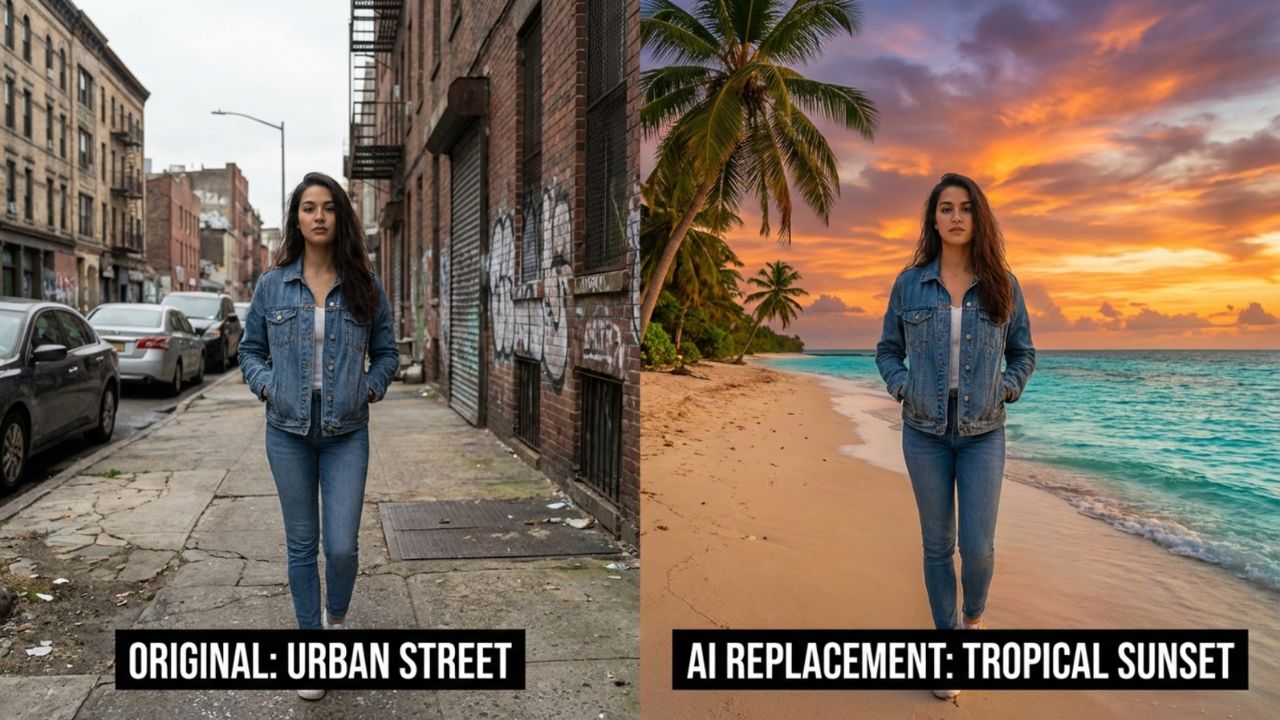
Artificial intelligence has made photo editing significantly easier than before. Tasks that once required advanced software like Photoshop can now be performed with simple text instructions. Modern AI tools such as ChatGPT image editor, Google Gemini, Leonardo AI, DALL·E, and Flux allow users to upload a photo and modify elements like lighting, colors, and backgrounds within seconds.
One of the most popular features people use today is AI background replacement. Whether someone wants to turn a normal selfie into a professional portrait, place themselves on a tropical beach, or create a cinematic scene, AI prompts can generate entirely new environments instantly.

However, the key to getting high-quality results lies in writing clear and descriptive prompts. This article provides ready-to-use AI prompts to change photo backgrounds instantly, helping users achieve professional-looking edits without needing technical editing skills.
Table of Contents
What Are AI Background Editing Prompts?
AI background editing prompts are written instructions used to guide an image-generation or editing model when replacing or modifying the background of a photo. These prompts tell the AI system what type of scene should appear behind the subject while keeping the main subject natural and realistic.
For example, a prompt might instruct the AI to replace the background with a tropical beach, a modern city skyline, or a luxury studio setting. When the prompt clearly describes the lighting, atmosphere, and environment, the AI tool can generate a more realistic result.

Many AI platforms now support background editing features where the user simply uploads an image and enters a prompt describing the desired environment. The AI then intelligently removes the original background and replaces it with a new scene while preserving the subject.
Using structured prompts improves the output quality and reduces the need for multiple editing attempts.
Best AI Prompts to Change Photo Backgrounds
The following prompts are designed to work across popular AI image editing tools. Each prompt can be copied and adjusted depending on the type of image being edited.
Tropical Beach Sunset Background
Prompt
Replace the background with a tropical beach at sunset, golden hour lighting, soft ocean waves, warm sunlight reflecting on the water, cinematic atmosphere, high-resolution photography style.
Result
This prompt creates a relaxing beach environment with warm natural lighting.
Modern City Skyline Background
Prompt
Replace the background with a modern city skyline at night, glowing skyscraper lights, subtle reflections, cinematic urban environment, professional photography style.
Result
Ideal for creating stylish urban portraits or social media photos.
Scenic Mountain Landscape Background
Prompt
Replace the background with a scenic mountain landscape, clear blue sky, natural daylight, lush green hills, realistic photography style.
Result
This prompt produces natural outdoor scenery suitable for travel-style photos.
Professional Office Workspace
Prompt
Replace the background with a modern office workspace, minimalist desk setup, soft indoor lighting, professional environment, high-detail photography style.
Result
Useful for professional profile photos and business headshots.
Luxury Studio Portrait Background
Prompt
Change the background to a luxury portrait studio with dramatic lighting, subtle shadows, elegant dark backdrop, professional photography atmosphere.
Result
Creates a high-end studio portrait effect.
Cozy Café Environment
Prompt
Replace the background with a cozy coffee shop interior, warm ambient lighting, wooden furniture, soft bokeh lights in the background, natural photography style.
Result
Produces a relaxed lifestyle photography setting.
Futuristic Sci-Fi City Background
Prompt
Replace the background with a futuristic sci-fi city, neon lights, glowing skyscrapers, cyberpunk atmosphere, cinematic lighting.
Result
Creates dramatic futuristic visuals.
Tropical Jungle Background
Prompt
Replace the background with a lush tropical jungle environment, dense green foliage, soft sunlight filtering through leaves, high-detail nature photography style.
Result
Suitable for adventure or travel-style images.
Elegant Hotel Lobby Background
Prompt
Replace the background with a luxury hotel lobby, marble floors, soft golden lighting, elegant interior design, professional photography atmosphere.
Result
Produces premium-looking portraits.
Sunset Desert Landscape
Prompt
Replace the background with a vast desert landscape during sunset, warm golden tones, dramatic sky, cinematic lighting, realistic photography style.
Result
Creates visually striking travel-style imagery.
AI Prompts for Social Media Backgrounds
Many users edit backgrounds specifically for social media posts or profile images. These prompts are designed for visually appealing backgrounds.
Instagram Style Aesthetic Background
Prompt
Replace the background with an aesthetic pastel-colored environment, soft lighting, minimal design, modern Instagram photography style.
Neon Light Background
Prompt
Replace the background with vibrant neon lights, glowing colors, cyberpunk atmosphere, dramatic lighting.
Luxury Lifestyle Background
Prompt
Replace the background with a luxury rooftop setting overlooking a city skyline, sunset lighting, modern architecture.
Minimalist Background
Prompt
Replace the background with a clean minimalist background, soft neutral tones, subtle shadows, modern photography style.
Tips for Better Background Replacement Results
Writing effective prompts improves the realism and quality of AI-generated edits. The following tips can help achieve better results.
- Clearly describe the environment you want the AI to generate.
- Mention lighting conditions such as sunset, daylight, or studio lighting.
- Use photography terms like cinematic lighting or professional photography style.
- Keep the prompt focused on a single background idea.
- Adjust the prompt slightly if the first result does not match expectations.
These techniques help AI tools generate more accurate and visually appealing backgrounds.
AI Tools That Support Background Editing Prompts
Several AI tools now allow users to replace or modify image backgrounds using text prompts. Many of these tools combine image editing with advanced AI generation models.
ChatGPT image editor allows users to upload an image and describe changes using text instructions. The AI model interprets the prompt and edits the image accordingly.
Google Gemini also supports AI-powered image editing where users can replace backgrounds or modify visual elements through prompts.
Other platforms such as Leonardo AI, Flux, and DALL·E provide similar capabilities. These tools are commonly used for generating creative environments, improving photos, and producing professional-quality visuals.
Because most modern AI image tools use similar prompt systems, the prompts provided in this guide can often be used across multiple platforms.
That all Promet